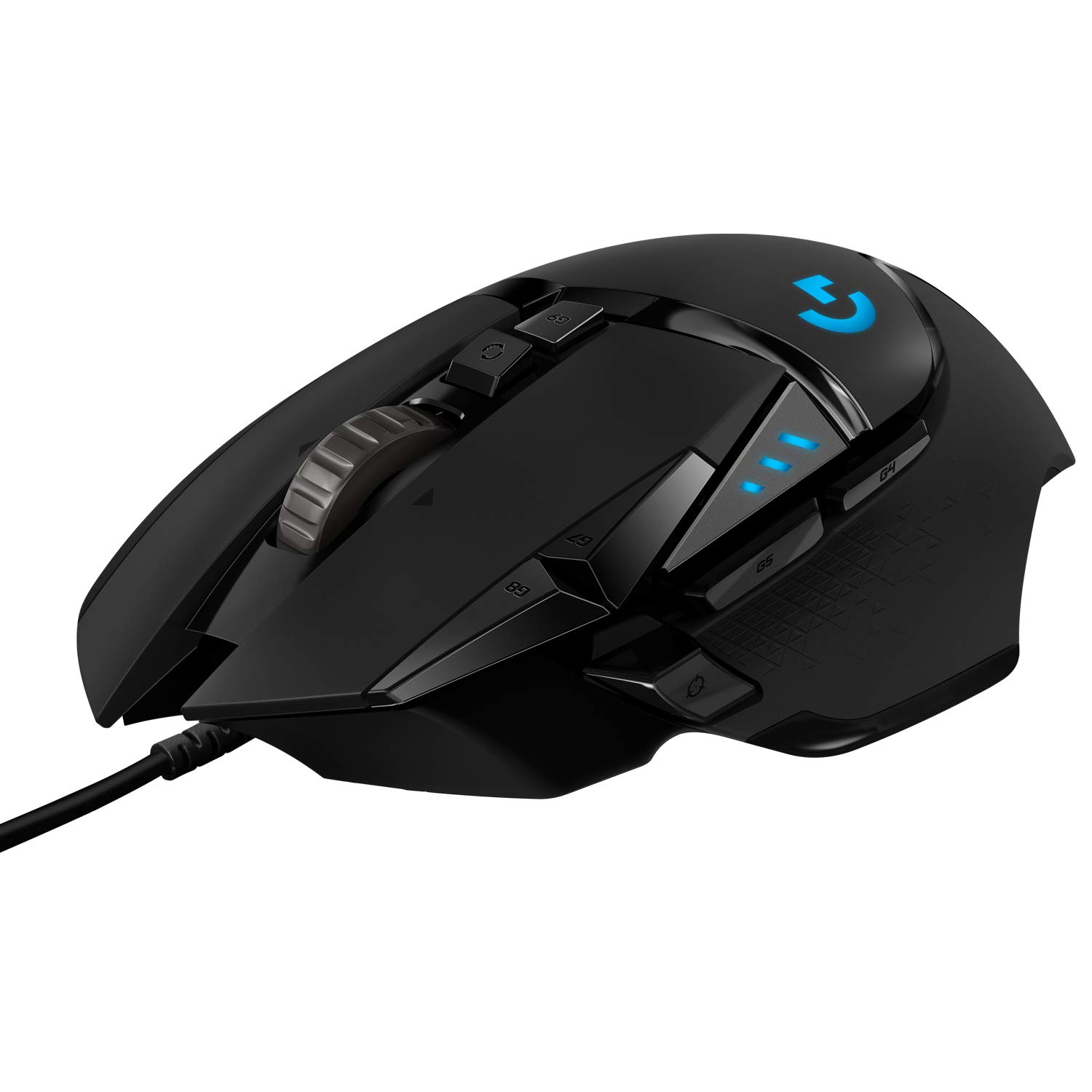
Featured product
Logitech G502 X Gaming Mouse
by Logitech
See current price & options at AmazonThis link opens live Amazon search results for this product, so the price and availability you see are always current. We do not list prices here.
Why it has stayed popular
The Logitech G502 line has been a staple of PC gaming setups for years, prized for its distinctive sculpted shape, adjustable weight system, and abundant programmable buttons. It balances precision tracking with a layout that suits both FPS players and MMO enthusiasts, which has kept it relevant across multiple hardware generations.
Who It Fits
The Logitech G502 X Gaming Mouse is built for players who want a versatile, feature-rich pointer rather than a stripped-down competitive shell. Its ergonomic right-handed shape accommodates palm and claw grippers especially well, with a thumb rest and textured side panels that help maintain control during long sessions. If you bounce between shooters, role-playing games, and productivity tasks, the multiple programmable side buttons and adjustable scroll wheel modes make it easy to assign macros, weapon switches, or navigation shortcuts. The tunable weight system appeals to users who like to fine-tune feel, whether they prefer a heavier, planted glide or a lighter, flick-friendly setup. It is less ideal for left-handed players or those who favor ultra-light mice for fast-paced competitive play, since the sculpted shape and feature set add some heft. Still, for gamers who value customization and a familiar, proven design, it remains a go-to choice that adapts to many playstyles without forcing compromises.
What to Weigh Before Buying
Before committing to the Logitech G502 X Gaming Mouse, consider whether you actually need its extensive feature set. The adjustable weight cartridge, multiple programmable buttons, and dual-mode scroll wheel are genuinely useful, but they also add complexity that simpler mice avoid. Some users find the shape slightly bulky, especially those with smaller hands or fingertip grips, so it is worth thinking about how you hold your mouse day to day. Wireless versus wired connectivity is another factor; both versions exist in the lineup, and your tolerance for cable drag or charging routines should guide your choice. Sensor performance is excellent across the board, so the real differentiator is feel and ergonomics rather than raw tracking accuracy. Also consider software: Logitech's configuration utility is powerful but can feel heavy if you only want basic tweaks. Finally, the bold, gamer-centric aesthetic is not for everyone, so if you prefer understated desk gear, the angular design may stand out more than you would like.
Alternatives to Consider
If the Logitech G502 X Gaming Mouse does not quite fit, several established alternatives cover different priorities. The Razer Basilisk line offers a similarly ergonomic right-handed shape with a handy sniper button, appealing to shooter fans who want quick sensitivity toggles without the full weight-tuning system. For players seeking a lighter, more minimalist feel, the Logitech G Pro series and Razer Viper line emphasize low weight and ambidextrous-friendly shapes, which suit competitive FPS play better. Those who want a wealth of side buttons for MMOs and productivity macros might look toward mice with dedicated key grids, though those tend to be more specialized. If budget is a concern, older G502 generations retain much of the same DNA and remain widely available, offering the core shape and sensor without the newest refinements. Ultimately, the right pick depends on grip style, game preferences, and how much customization you value over simplicity.
Frequently asked questions
Is the G502 X good for productivity work as well as gaming?
Yes. The programmable buttons, comfortable shape, and dual-mode scroll wheel make it useful for spreadsheet navigation, creative software shortcuts, and general desktop tasks. Many users appreciate it as a hybrid mouse, though its gamer-focused aesthetic may not suit every office environment.
What is the difference between wired and wireless versions?
Both versions share the same shape, sensor, and core features. The wireless model adds charging convenience and cable-free movement, while the wired version avoids any charging routine. Performance is comparable, so the choice mostly comes down to preference and tolerance for occasional recharging.
Does the adjustable weight system really matter?
It depends on personal preference. Some players love fine-tuning heft for different games, while others set it once and forget it. If you have never cared about mouse weight, the system is a nice extra rather than an essential feature, but it does add flexibility for users who like to experiment.